Code Paths
A lot of the detail you see in CodeGlass comes from something called code paths.
Instead of only telling you that a function is slow, CodeGlass tries to show where inside that function things slow down. That is what code paths are used for.
A code path is built from three pieces:
- the function itself
- the function that was called just before it
- the function it belongs to
So it is not just “this function ran”, but more like “this function ran here, right after that other function, inside this parent”.
A Simple Example
In the screenshot below (from the code body statistics view), we look at a function called ForLoopDifferentOutcomes.
Its code path looks like this:
ForLoopDifferentOutcomes→ the function itselfrand→ the function that ran just beforeCallStackFive→ the parent function
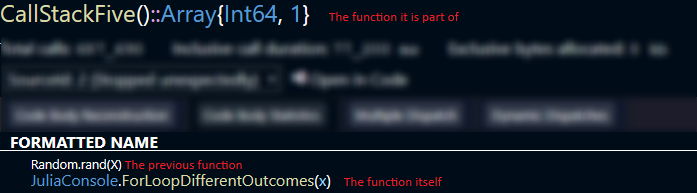
Whenever CodeGlass shows stats for a code path, it means it is tied to that exact situation.
Same Function, Different Paths
Calling the same function twice does not always mean it is the same code path.
function parent_function()
    a()
    b()
    c()
    b()
end
Here, b is called twice. Both calls are inside parent_function, but:
- the first call happens after
a - the second call happens after
c
That makes them two separate code paths.
When Paths Look the Same
Sometimes different flows end up sharing the same code path.
function parent_function()
    a()
    if condition
        exponentially_scaling_function(10)
    else
        exponentially_scaling_function(10_000)
    end
end
Even though the work is very different, both calls:
- happen after
a - belong to
parent_function
So CodeGlass treats them as the same code path and combines the stats.
This can hide big differences, like one call being fast and the other being very slow.
Dynamic Dispatch and Extra Paths
Julia can create multiple versions of a function depending on the types it sees.
function add_one(x::Real)
    return x + 1
end

add_one(1)
add_one(1.0)
This looks like only one function is called in this function, but in practice there may be multiple versions of + depending on the type of the value x.
In this case, Julia can decide to use a version of + that supports a float and an int.
As CodeGlass treats each of these as separate functions, this means you end up with more code paths than you expect.
This is also why the code body reconstruction is not a direct copy of your source code, but why it shows what actually ran.
Time and Allocations Between Calls
CodeGlass measures time based on function calls. But not everything in your code is a function call.
function parent_function()
    a()
    x = Int64[]
    b()
end
The array allocation happens between a and b. Since it is not a function call, CodeGlass attaches that time and allocation to the next function, which is b.
So the code path for b includes:
- time spent after
a - the allocation of the array
- the execution of
bitself
What Happens With Filters
If you have applied a filter, the timings of the filtered function is also included in the code path, just like time spend between the calls. If a function is filtered, CodeGlass doesn't know about it, and therefore cannot make a code path for it. To fix this, those timings are included in the next functions code path.
function parent_function()
    a()
    filtered()
    b()
end
If filtered is hidden, its time is added to the next unfiltered function, which is b.
If filtered calls other functions that are not filtered, those still show up. They appear as if they happened directly between a and b.
This is similar to what happens when Julia inlines a function. The inlined function disappears, and its work is merged into the surrounding code.
Return Code Paths
CodeGlass also tracks return code paths.
These are similar to normal code paths, but instead of pointing to a function, they point to a return.
They do not include timing data, because a return itself does not take time.
If you return a function call:
function parent_function()
    return a()
end
CodeGlass treats it like this:
function parent_function()
    x = a()
    return x
end
So the call to a and the return are handled as separate steps.